A MixMeister Alternative for Windows and Mac
Updated 24 November 2026
Loved MixMeister? You’ll Feel Right at Home.
The simplicity you loved. The creative freedom you’ve been missing.
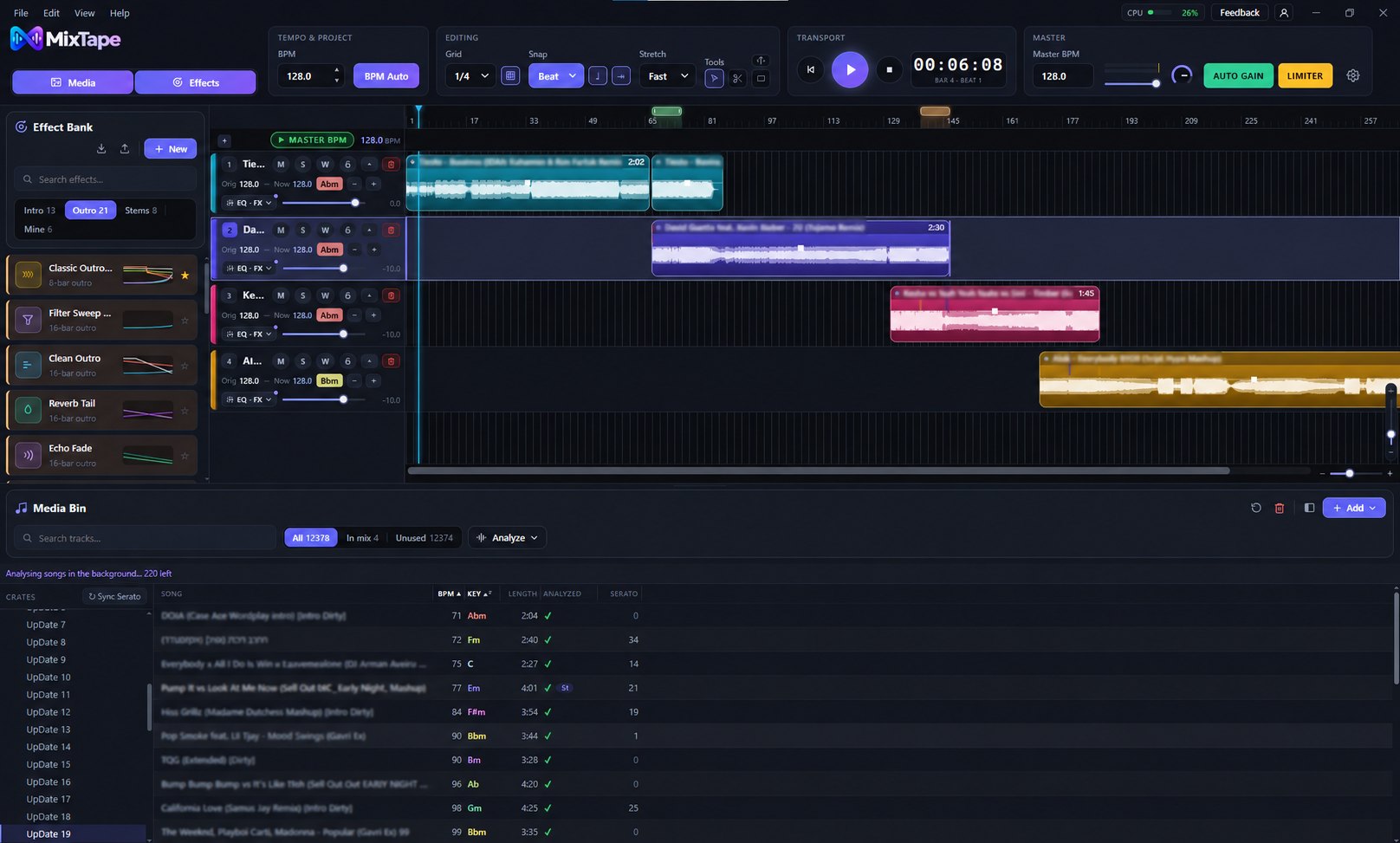
MixTape brings the familiar timeline-based workflow of MixMeister into a modern DJ studio, with drag-and-drop effects, selective stems, and intuitive tools for creating transitions and mashups.
And now, with MixTape 0.75.0, you can import your existing MixMeister 6 and 7 projects directly into MixTape.
Bring your MixMeister sets with you.
Download MixTapeSee How Import Works
We’re Looking for 5 MixMeister Users
Help us test and improve MixMeister project importing.
We’ve introduced MixMeister project importing, and we’re inviting five experienced MixMeister users to test it with their real projects.
We’re especially interested in DJs with existing .mmp files who can compare their original mixes with the imported versions and share honest, detailed feedback.
What You’ll Get
- 12 Months Free A full year of MixTape access at no cost.
- 50% Off a One-Time License After your free year, receive a 50% discount on a one-time MixTape license purchase.
- Help Shape the Product Work directly with the development team to identify import issues, improve transition accuracy, and help make MixTape better for the MixMeister community.
Apply to Be One of Our 5 Testers
Limited to 5 selected testers. No credit card required. Honest feedback is welcome, including criticism.
Your MixMeister Projects. A New Timeline.
Years of creating mixes shouldn’t mean starting over with a new application.
MixTape 0.75.0 introduces support for importing MixMeister 6 and 7 project files (.mmp).
Open an existing project and MixTape reconstructs your track arrangement on its timeline, including supported tempo changes, volume automation, and EQ curves.
Some elements require approximation, and certain effects cannot be transferred. MixTape provides a detailed import report so you can see exactly what was imported, what was adjusted, and what needs attention.
Your original MixMeister project is never modified.
Import in Four Steps
- Choose Your Project Select File → Import MixMeister Project, or use the import option on the MixTape welcome screen.
- Locate Your Music MixTape checks the original file locations. If songs have moved, select a folder or locate the files manually.
- Open Your Mix Your project opens on the MixTape timeline with its reconstructed track arrangement and supported automation.
- Review and Refine Check the import report, listen to the transitions, and make any adjustments using MixTape’s editing tools.
Coming from MixMeister? You do not have to relearn your hands. MixTape lets you assign your own keyboard shortcuts and save them as profiles. See how custom shortcuts work.
Everything You Loved About Timeline Mixing. And More.
- A Familiar Timeline Arrange tracks visually, control tempo changes, and refine individual transitions without recording your entire DJ set again.
- Drag-and-Drop Effects Create smooth blends, filter sweeps, echo transitions, and creative outros using built-in Intro and Outro effects. Customize effect automation and save your own presets.
- Selective Stems Separate vocals, drums, bass, and other elements from specific regions of a track. Move vocal phrases to additional timeline tracks, remove conflicting drums, and create mashups using the parts of a song you actually need.
- Your Serato Library Import crates, subcrates, beatgrids, cue points, and supported track information from Serato. Your original Serato data is not modified.
- Export Your Finished Mix Export completed mixes to MP3, WAV, or FLAC.
Simple Like MixMeister. Flexible Like Ableton.
MixMeister made timeline mixing approachable.
Ableton offers extensive creative possibilities, but its workflow can be more than a DJ needs when the goal is simply to build a polished mix.
MixTape combines familiar timeline editing with creative effects, automation, and stems in an interface designed specifically for DJs.
Less time tweaking. More time creating.
What You Should Know About Importing
We believe it’s important to be transparent about what works and what still requires attention.
MixTape supports importing projects from MixMeister 6 and 7.
Track arrangements, cuts, beatgrid information, and supported musical parameters can be reconstructed. Tempo changes, volume and EQ curves, loops, and certain other elements may require approximation.
Third-party plug-in effects and video are not imported.
After importing, MixTape generates a report showing what transferred accurately, what was approximated, and what could not be imported.
We recommend listening through your imported mix and reviewing the transitions before exporting the finished result.
Frequently Asked Questions
Can MixTape open my existing MixMeister projects?
Yes. MixTape 0.75.0 supports importing MixMeister 6 and 7 project files (.mmp). It reconstructs the track arrangement and supported musical information on a new MixTape timeline. Some elements may be approximated or unsupported.
Will MixTape change my original MixMeister project?
No. MixTape opens the project as a separate, unsaved MixTape project. Your original .mmp file remains unchanged.
What happens if MixTape can’t find my music files?
You can choose a folder to search or locate individual files manually. Missing tracks can also be re-linked later.
Will my effects and transitions sound exactly the same?
Not necessarily. Volume and EQ automation can be reconstructed, sometimes approximately, but third-party plug-in effects are not imported. Review the import report and listen to the result before exporting.
Do I need a DJ controller?
No. MixTape is designed for creating prerecorded DJ mixes using your mouse and keyboard.
Does MixTape work on my computer?
MixTape supports Windows 10/11 (64-bit) and Apple Silicon Macs running macOS 13 or later. Intel Mac support is in progress.
Is MixTape free?
MixTape is currently free during beta, with registration and approval required. We’re also selecting 5 MixMeister users for a dedicated testing program that includes 12 months of free access and a 50% discount on a subsequent one-time license purchase.

Choosing between timeline apps? Compare MixTape with DJ.Studio.
Your Mixes Have a History. Keep Building on It.
You already know the value of working on a timeline.
Now you can bring your existing MixMeister projects into a modern environment with flexible effects, selective stems, and intuitive editing.
MixTape — The Timeline DJ Studio.
Build Your DJ Set. Perfect Every Transition.